Wasabi Docs
Getting Started
Why Wasabi
Using Wasabi
Building Wasabi
FAQ
Glossary
Getting Started
Why Wasabi
Using Wasabi
Building Wasabi
FAQ
Glossary
  • Introducing Wasabi

    • Explain Wasabi like I'm 5
  • Installing Wasabi

    • Install-package
  • Using Wasabi

    • Wallet Generation
    • Wallet Load
    • Receive
    • Coinjoin
    • Send
    • Hardware Wallet
    • Bitcoin Full Node
  • Best Practices

    • Password Best Practices
    • Wasabi Backup Best Practices
    • Change Coins
  • Restoring Wasabi

    • Recover a Wallet
    • Restoring Wasabi Wallet in Other Wallets
  • Advanced Installing Wasabi

    • Build from source code
    • Deterministic Build
    • Wasabi Setup in Virtual Machines
  • Advanced Using Wasabi

    • Discreet Mode
    • Testnet
    • PayJoin
    • Headless Wasabi Daemon
    • Starting Wasabi with parameters
    • RPC Interface
    • Supported BIPs

Discreet Mode

Discreet Mode is a Wasabi Wallet feature that hides sensitive and critical information from physical observers and allows you to post screenshots without worrying about your privacy.
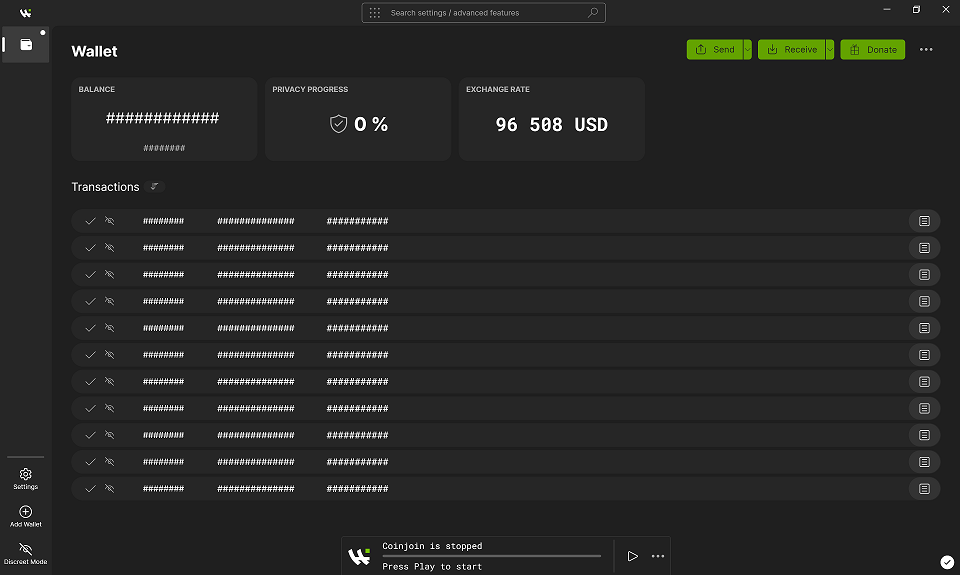
Wasabi Wallet Discreet Mode

  • How to activate/deactivate Discreet Mode
  • More information on Discreet Mode

How to activate/deactivate Discreet Mode

You can activate or deactivate by clicking the Discreet Mode icon in the bottom left corner of the main view.

Enable Discreet Mode in Wasabi Wallet

Disable Discreet Mode in Wasabi Wallet

More information on Discreet Mode

  • In Discreet Mode the wallet is still usable, meaning that you can send and receive payments, as well as coinjoin.
  • Discreet Mode only masks the surface. This means that when you click to see more Details, some information (which wasn't visible at first) will be shown.
  • When hovering over the ### chars with the cursor, the content will be visible for a short amount of time.
  • Some justification of design decisions can be seen here.
Edit this page
Last Updated: 5/18/26, 7:35 PM
Next
Testnet